

Volunteer timesheets are useful for several important reasons and can be used in a variety of ways:
Why have volunteer timesheets?
Recognition and appreciation – Recording hours helps organisations acknowledge and thank volunteers for their contributions.
Tracking contributions – It provides a clear record of the time and effort volunteers give.
Reporting and funding – Many organisations need to report volunteer hours for grants, audits, or funding applications.
Planning and management – Helps coordinators understand staffing needs, identify busy periods, and allocate resources effectively.
Accountability – Ensures transparency and verifies activities for both volunteers and the organisation.
How to use them
Monitor participation – Track attendance, engagement, and consistency.
Generate reports – Create summaries of total volunteer hours, projects supported, or trends over time.
Support recognition programs – Use data for awards, certificates, or milestones.
Improve operations – Identify gaps or areas where more volunteers are needed.
Evaluate impact – Measure the overall contribution of volunteers to organisational goals.
Using the Timesheet App
Find out how to use the Timesheet App so volunteers can easily record and submit their hours. Provide guidance or training to show them how to log in, enter their time accurately, and submit timesheets regularly.
Adding Timesheets
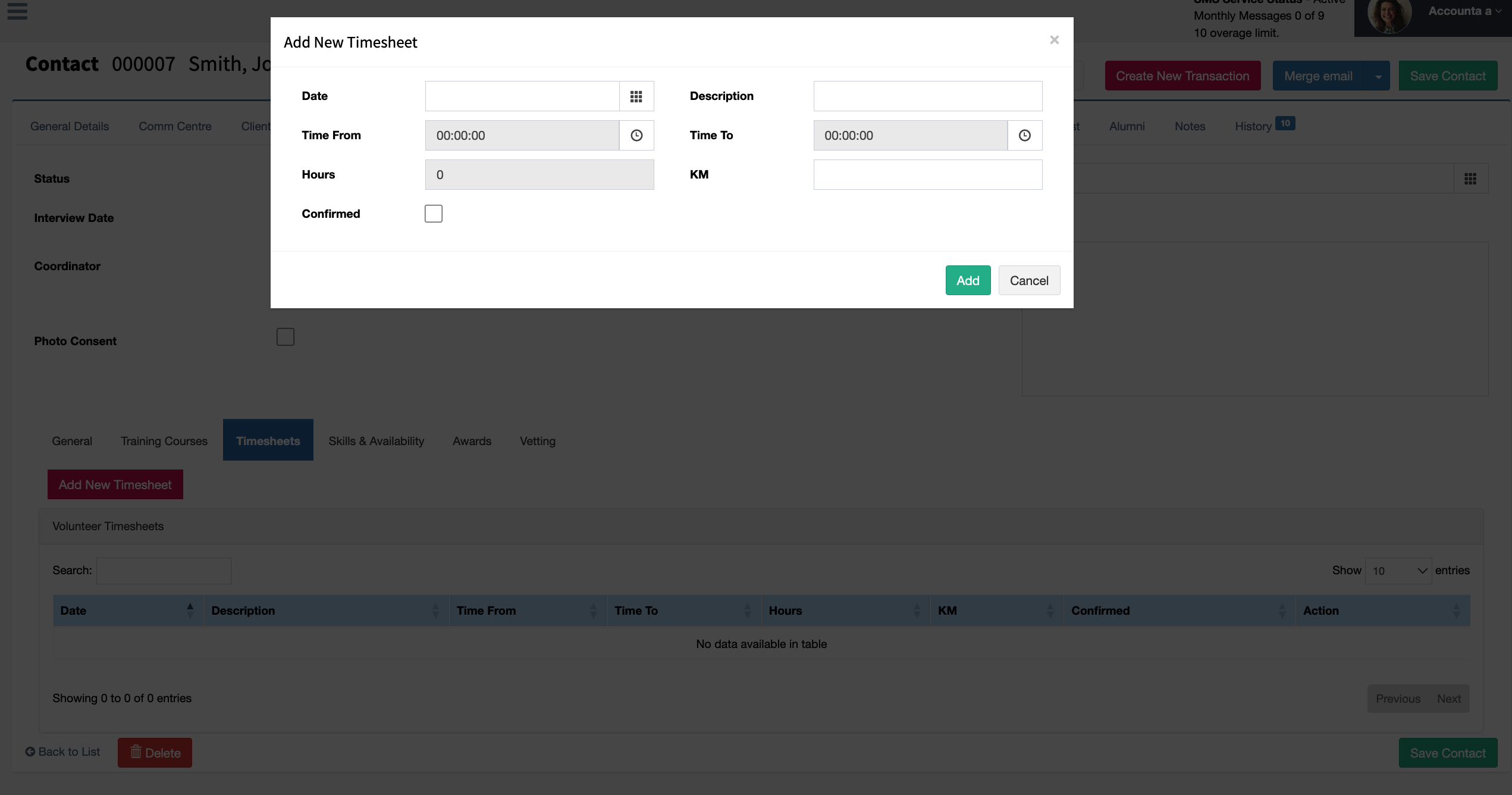
Timesheets can be added through the Timesheets section under the Volunteers tab in Contacts. Selecting Add New Timesheet will add a new timesheet record for the selected volunteer.
Date The specific day the volunteer carried out their work or activity. This helps track when the work was completed and supports accurate reporting.
Description: A brief summary of the task or activity performed. For example, this could include “food delivery,” “event support,” or “administration.” It provides context for the recorded time.
Time From: The start time of the volunteer’s activity. This marks when they began their work.
Time To: The finish time of the volunteer’s activity. This, together with the start time, helps calculate the total hours worked.
Kilometres (KM): The distance travelled by the volunteer while carrying out their duties, if applicable. This is useful for tracking travel contributions or reimbursements.
Confirmed: Indicates whether the timesheet entry has been reviewed and approved. This ensures the recorded information is accurate and verified.
Reporting
A Volunteer Timesheet Summary provides an overview of the total time and contributions made by volunteers over a specific period. It brings together individual timesheet entries to show the number of hours worked, types of activities performed, and any additional contributions such as travel (kilometres). This report can be found in System Reports in Reports under Reporting menu.