

Summary
The barcode in FundraiserOne is not an encrypted field it has to be created combining fields a few fields together. The printers will need to encrypt the field before the printing process.
Building a Barcode Field
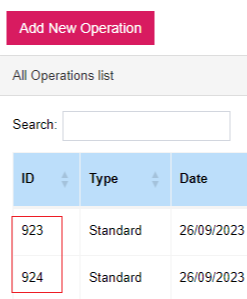
Step 1: Get the Operation ID this typically is the Operation that will be allocated when scanning the barcode. This can be done by opening the Operations section that lists all Operations.
Step 2: Get the Product ID, this can be done by running the Product Summary report under the Reporting menu.

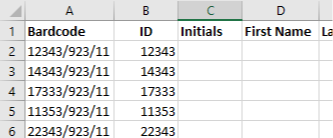
Step 3: Now the barcode field needs to be collection of CustomerID+'/'+OperaionID+'/'+ ProductID separated by "/" to identify each parameter. So typically the barcode fields need to look similar to the example below.
Note: Always request a proof from the printers so the barcode can be tested.
The barcoding system is an added feature it can be enabled on request - For more information and pricing see FundraiserOne pricing.