

Summary
In this article, we’ll be exploring how to create queries for your journeys to ensure precise, reliable supporter selection every time. Queries act as the intelligence behind your journeys, allowing you to define exactly who should enter each step based on behaviour, history, or engagement.
By learning how to build and refine these queries, you’ll be able to create targeted journeys that respond dynamically to supporter actions, keep your messaging relevant, and maintain full control over who progresses through each stage. This approach ensures your journeys remain accurate, efficient, and consistently aligned with your fundraising goals.
Using Date Conditions
One of the most common conditions your journeys will rely on is date-based logic. Unlike a one‑off direct mail campaign — where a query runs once to pull a static list — journeys are dynamic. Their queries rerun automatically, so your conditions must compare dates relative to today’s date, not fixed points in time.
To achieve this, use the operators NDays, NMonths, and NYears. These represent “Number of Days,” “Number of Months,” and “Number of Years” from the current date, ensuring your journey always selects the correct supporters as time moves forward.
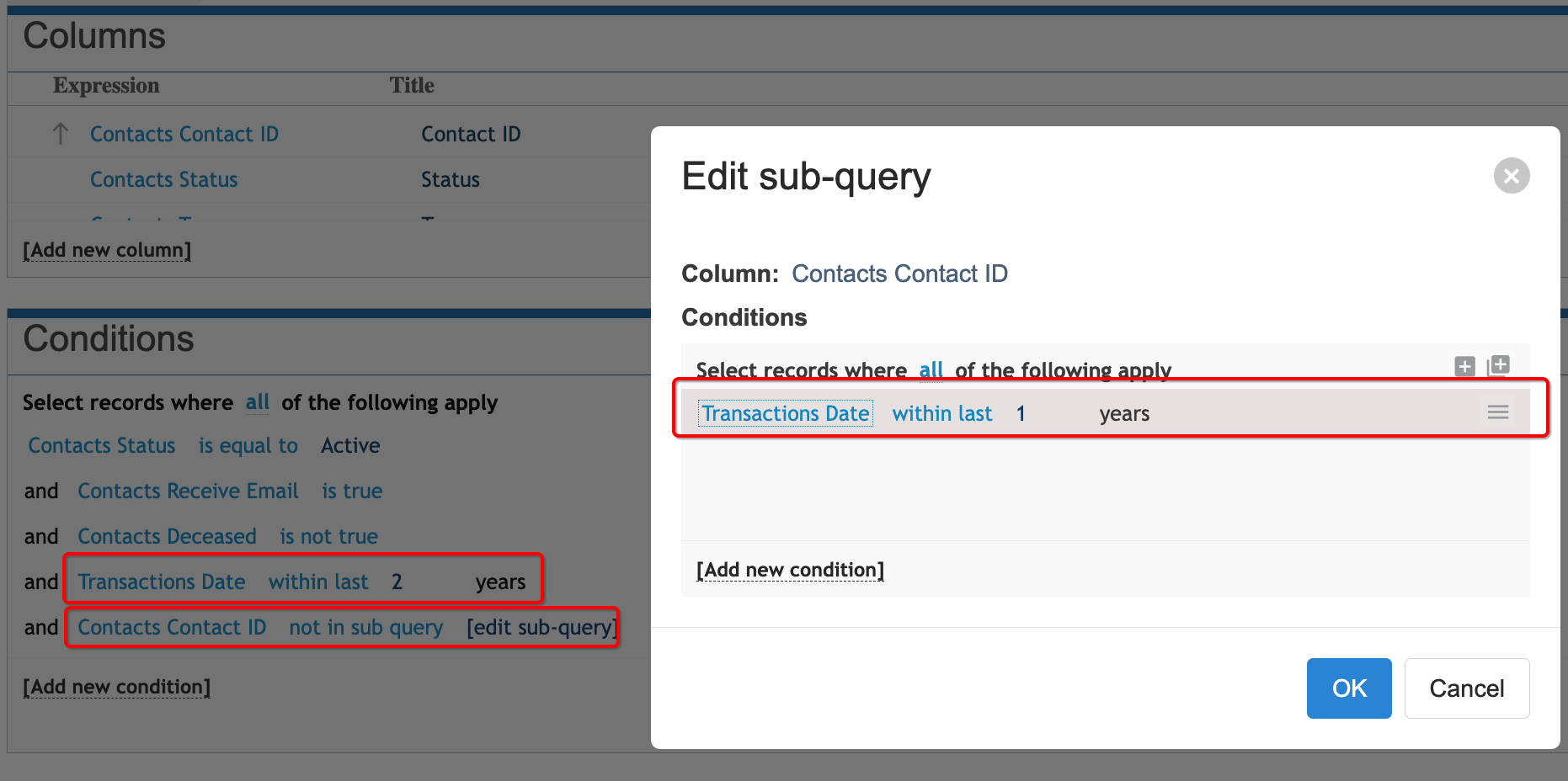
To create a condition that selects lapsed supporters who gave a gift two years ago but did not give last year, your query will need two conditions.
First, add a condition that selects supporters with Transactions – Date NYears 2.
Then create a Not‑in Sub Query that selects supporters with Transactions – Date NYears 1.
This ensures you include only those who donated two years ago and exclude anyone who donated last year, giving you a precise lapsed‑supporter segment.
Example below shows the two conditions:
Ensuring a supporter does not receive the same email multiple times is essential for maintaining a positive experience and keeping your journeys clean. Use conditions within your journey queries to check whether a supporter has already received the specific email template. By adding this filter, the system will only send the message to supporters who have not previously received it, preventing duplicates and keeping communication relevant.
If you’re working between journey flows, you’ll want to confirm that supporters have received all previous emails in the sequence but have not yet been sent the current email you plan to trigger. This ensures each supporter progresses through the journey correctly and never receives the same message twice.
Use conditions in your journey queries to check for both:
Has received earlier templates
Has not received the current template
This keeps your journey clean, accurate, and prevents duplicate sends.
You can query sent templates by using the Merges table, which stores information about each communication merge. This includes both the Sent Date and the Delivery Status, allowing you to filter supporters based on whether a specific template was sent, when it was sent, and whether it was successfully delivered.
Include who has received "Lapsed Donor Journey 1" - Merges equals to "Lapsed Donor Journey 1" Template
Merges was sent last 10 days
Exclude anyone who has already received "Lapsed Donor Journey 2" - Merges Exclude "Lapsed