

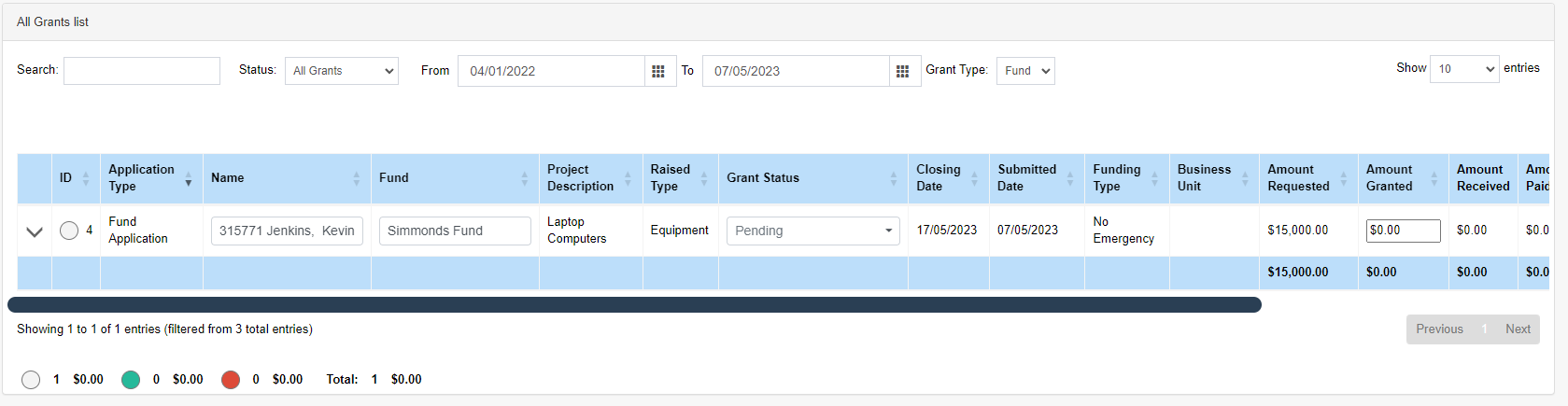
This section allows users to view all applications similar to spreadsheet view and make changes quickly.
Use the search to find applications and use the date filters to filter the applications for the current year.
Totals below give users a quick running total on what has been requested, granted and payed.
Applications can be edited from here too by scrolling over to the right and pressing the Edit button. This will launch the contact card.
Applications Tags: These are used to categorise applications by applying coloured tags to each fund. Doing will also apply the totals for each colour in the footer section of the list.
Name: Moving application from one to another use the name field to move applications to other contacts by clearing the name and searching for the contact required,
Fund: Moving applications to other funds this is sometimes required especially if the fund is allocated to a incorrect fund or this screen can be used to easily allocate funds to applications.
Grant Status: Update and apply different status to each application.
Amount 'Granted: Amounts for applications can be applied here.

Edit: Opens the contact card and opens the application file.
New Payment: Create a payment for an application. This used when paying out an application totals will applications approved/granted and amounts payed.